Anything Photoshop or Photography

Latest

Checking out a Flower

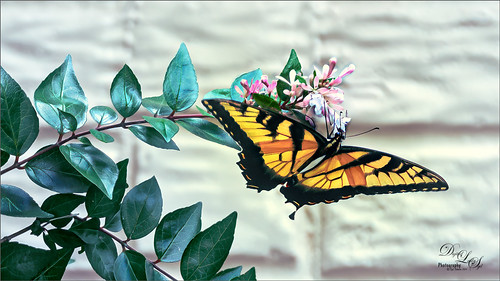
Image of a Swallowtail Butterfly in Virginia.

This beautiful Swallowtail Butterfly (of some type I believe) was enjoying a pink and white flower while in a rural area of Virginia a couple months ago. What a beauty she was! And this plant had at last 20 or 30 butterflies flying around it. In LR, just my basic changes were made – no presets, filters or brushes. In PS Topaz Sharpen AI was set to Stabilize, Remove Blur 0.79 and Suppress Noise 0.49. A Color Lookup Adjustment Layer set to PhotoFocus LUT called PF-Candlelight at 62% layer opacity was next. On a New Layer, some of the small halos around the green leaves was renived by cloning out with a very small brush. The image was lightened just a little with a Curves Adjustment Layer. A New Layer was set to Overlay blend mode and used a small brush to add some contrast into just the flowers. Viveza 2 was used last to adjust the colors and focus of the image. What a pretty butterfly!…..Digital Lady Syd

The Purplepassion Flower

Image of a purple Passionflower from Harry P. Leu Gardens in Orlando, Florida

This Purplepassion Flower image was taken at the Harry P. Leu Gardens in Orlando, Florida a while ago. It is a very beautiful bloom and there is a little bee hiding in it. Mainy did the clean up in Luminar (see sidebar for website link) Flex with their wonderful Structure, Detail Enhancer, Image Radiance, Microstructure, and HSL filters. In Photoshop used a Gradient Map tAdjustment Layer to emphasize the color a little. Then used Topaz (see sidebar for website link) Studio 2’s fabulous Impression filter – just adjusted the default settings a little to smooth out the background. Then used Mixers brushes back in Photoshop to further blend in the effect. Finally used Topaz Lens Effects Fog filter to lighten the top slightly. Viveza 2 was used to adjust the focal point and the last step was a Curves Adjustment Layer. The text is a font called Brettany ….. Digital Lady Syd

Practicing in Painter

Corel Painting of sailboats

Just got an updated version of Corel Painter so decided to try out a few of the new Thick Paint Brushes. I will not go thru all the steps but the thick paint was used on the sails and parts of the boat reflections. I have to admit most of the real post work ended up in PS where I did more sketch work and added the textures. Overall it was just a lot of fun to do – and that is what it is all about. Check L. S. Lowry‘s art work as he did some beautiful paintings – and his original looks a lot different (and better) than this one. ….. Digital Lady Syd

Hiding in a Palm Tree

Image of a little bluebird female in one of my big palm trees.

I think this is a little Eastern Bluebird female who was helping me while I cleaned up my flower beds in my front yard. Not much was done in Lightroom, and Photoshop added Viveza 2 filter to sharpen her up a bit. The light was really dark in the palm tree, but really bright behind her so it was hard to get that looking correct. A Curves Adjustment Layer was used for this. Just a slight painterly effect was added in Topaz (see sidebar for website link) Studio 2’s Impression filter. Then in PS on a few New Layers, mainly just painted in some lines in the foreground palm fronds as they were really blurred. The Camera Raw filter was used to further tweak the color in the HSL panel. Topaz Lens Effects’ Soft Olive Green Vignette preset was added. That was it!…..Digital Lady Syd

Sparkling in the Sun

Image of one of the Mandalay Bay Hotel in Las Vegas fountain areas.

This image was taken a while ago during a KelbyOne Photoshop World held at the Mandalay Bay Hotel in Las Vegas. Did basic changed in Lightroom and in Photoshop applied Luminar (see sidebar for website link) Flex using the Accent AI Filter 2.0, Structure, Dehaze, Microstructure, Clarity, and HSL filter. Three Color Lookup Adjustment Layers were added: Denny Tang’s Yashica F521 Action preset, PhotoFocus B&W Contrast 01 preset (found in their Toolkit) set to Luminosity blend mode , and PS Foggy Night preset at 43% layer opacity. The last step was to add a Red Channel Curves Adjustment Layer (see my How to Use a Red Channel to Create a Nice Blended Image Effect blog) so just the lighter colors were affected. No other changes were done to this image. …… Digital Lady Syd

Quietly Reflecting

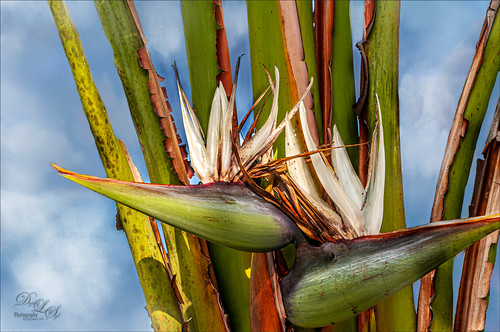
Image of an Orange Bird of Paradise bloom in my yard.

Just a quick blog – was practicing my photography today and got an image of a beautiful orange Bird of Paradise bloom in my yard. Had some creative fun by adding a Flaming Pear’s Flood Filter effect. It still has the best reflection effects of any Photoshop plug-in around. The free font is one called East Liberty Signature. Very little was done to this image other than the background was darkened down and a few old leaves were removed. Overall a pretty simple image. …..Digital Lady Syd

Buildings and Buildings

Mock up advertising add of painting buildings in front of real buildings.

Had a lot of fun creating this image. Actually I had created the rather abstract image of a hotel on Oahu in Hawaii. The Free Modern City Advertisement Billboard Mockup was by freemockupzone.com. The painting effect was created using Topaz (see sidebar for website link) Studio 2’s AI ReMix filter (Fraying Shadows preset), then another AI ReMix filter (Neon Feather preset), Motions Blur Filter twice, and Edges. Colors were changed using a Hue/Sat Adjustment Layer back in PS. Several layers of painting and a Curves Adjustment Layer to finish up. By adding my painted image into the Smart Object of the mockup, the above image was created. Finished up using the Late Sunset Color Lookup Adjustment Layer at 24% layer opacity and a Levels Adjustment Layer to blend the two images together nicely. This actually turned out pretty nice!…..Digital Lady Syd

Ahh! That Feels Good

Image of a Jaguar at the Jacksonville Zoo in Florida

This sweet Jaguar resides the Jacksonville Zoo and seems a lot more relaxed than her crazy “cagemate” who spends most of his time prancing around his exhibit and roaring at anyone who looks at him. (See my Don’t Take My Picture!!! Tidbits Blog.) She sat posing for me and then I got this rather cute image – she looks just like a large domestic cat. Don’t think I would test this theory though! Not much was done to the image. In Lightroom the regular basic adjustments were done. In PS tried out an interesting new technique presented by Unmesh Dinda in his Free 100+ Amazing Duotone Presets for Photoshop! video. I liked the colors resulting from this technique. Used Viveza to sharpen up her face. Used a Levels Adjustment Layer to create a vignette and ended up with a Curves Adjustment Layer to add a little more contrast to the image. That was it!…..Digital Lady Syd

On Duty at the Zoo

Image of a Cardinal Bird taken at the Smithsonian National Zoo in Washington, DC

This beautiful male Northern Cardinal just sort popped in front of my while I was visiting the Lion exhibit at the Smithsonian National Zoo in Washington, DC recently. I decided to give him a better location as he was right in the middle of a bunch of us tourists. He was painted with mixer brushes and I believe an older Jai Johnson texture, with the colors and size of the texture changed to fit the scene. You do not have to keep a texture exactly the way it was when you got it. That is what makes it fun! Topaz (see sidebar for website link) Impression was used to paint in the foreground rocks – just the default settings with Brush 06 using the Graduated Filter to line it up on the front. The background birds are a brush from Jenteva Plant Brushes. Last step was a Curves Adjustment Layer. It is so relaxing to paint birds!…..Digital Lady Syd

Along the Road to Hilo

Image taken along the road to Hilo on the Big Island in Hawaii

Hawaii – what can you say – total eye candy for a camera. Had fun painting and playing with this image. It was not one of my better images but with a little persistence (almost stopped working on it twice), I am pretty happy with it. Yep, this image used Topaz (see sidebar for website link) Sharpen AI, Luminar (see sidebar for website link) Flex, Color Efex Pro, and Topaz ReStyle – hard to believe, but each filter had something special to add. That is an important point – sometimes only one filter in a program is needed combined with several other different types of filters. And with this image, the final was painted using a brush by G. Rutkowski called SB-9 Texture. Several other adjustment layers were added – just lots of fun to do!…..Digital Lady Syd