Anything Photoshop or Photography

Latest

Sleeping Boats

Image of the Wood Boats at at the Hilton Waikoloa Village resort on the The Big Island in Hawaii.

I have to admit I am a lover of wood boats and this is probably one of the reasons I loved the Hilton Waikoloa Village resort on the Big Island in Hawaii. They have a wonderful long waterway where you can ride in the boats as long as you want – at night the stars are incredible to see. I will not go over all the detail used on this image but it took me forever to get it to look good. Just used all my workflow and a few paint and clone tricks to even everything out. And I did use Topaz (see sidebar for website link) Sharpen AI – it did a fabulous job on this particular image – this program just keeps getting better and better! …..Digital Lady Syd

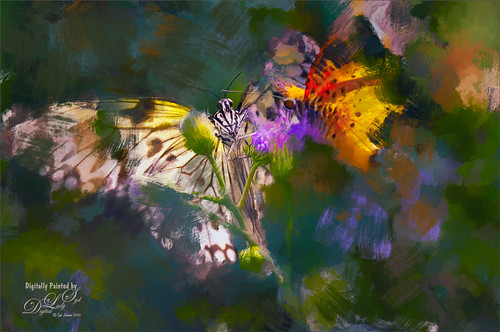
Butterflies Posing in Abstract

Image of two butterflies painted in abstract.

Continued having some fun with the Art History Tool in Photoshop (see my Creating an Art History Action blog for more info on this). Just added a few clean up layers after running the action and then used Viveza to direct the eye to the butterfly. This was a lot of fun to do as I really love these bright colors!…..Digital Lady Syd

New Guinea Singing Dog – Singing?

This was one of the cutest animals I have ever seen in a zoo – this one at the Palm Beach Zoo – seemed totally happy. He also had a buddy running around outside his doghouse. Just used a lot of different filters here – Topaz DeNoise AI (this filter is getting really good!), Luminar 4 (this program is becoming my go-to plugin for cleaning up an image – it is incredible) (see sidebar for website link), and an Exposure Adjustment Layer for the eyes. And then several individual layers were used to just clean up some of the edges of his face, muzzle and ears using an erodible brush by Aaron Blaise. That was it!…..Digital Lady Syd

Fisherman’s Cabin

This image was created using one of Shorpy.com’s great images called Fisherman’s Cabin-Shore Road-Magnolia-Cloucester-Massachusetts, cc1905. This image was run through the Image Colorizer (see my How to Colorize Using Image Colorizer blog for info on this) first, then after some clean up in PS before taking the image into Topaz Studio 2 where Impression, Edges, and Color Theme filters were applied. Then the image was taken into Corel Painter and the image was painted over where the canned Impression program left stroke I did not like. Back in PS, the Mixer brushes were used to do the final clean up on the image. Lots of fun to do!…..Digital Lady Syd

A Leopard Thinking

Drawing of a leopard

Just thought I would post my Leopard drawing – it looks a lot like the one Aaron Blaise teaches you how to draw in his Wildlife Painting Bundle – Leopard Painting Tutorial. (See my Got Some Free Time! Try Drawing! blog for the Elephant drawing I did from the same bundle.) Since being stuck at home so much, it was the perfect opportunity to work some more on my drawing skills. This image took a very long time to finish (yes many hours went into this), but overall it was a lot of fun to do. For me that is the name of the game! If you want to learn some of Aaron’s techniques, check out the link above for some super inexpensive offers or check out Aaron’s fabulous YouTube channel. And lots of great animal brushes are at his website also. ….. Digital Lady Syd

The Mighty Dragonfly

Image of a dragonfly

Had some fun giving this guy new background. The original background e was pretty much out of focus the image was shot at F5/6, and so a splash brush was used on a layer above to add some texture over the original background. (See my recent How to Use a Spatter Brush for a Background Effect blog for how to do this.) Topaz (see sidebar for website link) Sharpen AI was used to sharpen just the dragonfly. Some Dodging and Burning and Spotlight Effect was used on him. Last step was a Gradient Map Adjustment Layer using just reds and warm cream color. ….. Digital Lady Syd

What a Beautiful View!

Image of a view from Edinburgh Castle in Scotland

This is an image taken a while back at Edinburgh Castle in Scotland – missing not having any gorgeous landscape images to take like this one. Hard to believe these clouds were so dramatic! Not much done on this photo – just some LR basic processing, then in PS, Topaz (see sidebar for the website link) Denoise AI was used. Next a little Luminar (see sidebar for website link) and finished off with Viveza. All my favorite plugins!…..Digital Lady Syd

Fishing in 1904

Image from Shorpy of guys fishing in Whitefish Bay, Ontario in 1904

This image is a fabulous one from Shorpy.com, one of the best places to see great historical images. I decided to use one of my colorizing techniques since the image was so clear and interesting. Used my blog called How to Convert Black and White Images to Colorful Painting with Topaz Studio 2. The first step is very important as noted in the blog – make sure you have adjusted the resolution and size of the image before beginning to change the image. When opened in Topaz (see sidebar for website link) Studio 2, only AI ReMix was applied using Daylight Fade preset, High, Brightness 0.60, Contrast 1.00, Sat 0.75, Hue 0.15. From within Topaz Studio, Topaz Adjust AI was opened and set to Standard and Strength 0.71 – then mainly all the sliders were adjusted to get a really nice look. Back in PS, the skin color was painted in as for some reason it did not pick up color. The blue color came from Topaz ReStyle and Nik Viveza was used to even out the whole effect. This was the perfect image for this type of coloring…..Digital Lady Syd

Some Sunshine when It Is Raining

Digitally painted image of some sunflowers in a vase

Had some fun painting these wonderful sunflowers in Corel Painter. If you have Painter, I hope you are following Karen Bonaker who has a great website on how to use the program. Last week she shared the image and several brushes and taught us how to paint the flowers. It has been a long time since using Painter so it felt good to get back to it. And of course for me, I have to finish up in Photoshop and do my same adjustments on photos to my digital art. Anyway, it felt great to be painting again……Digital Lady Syd

Queen Emma Lily Displaying Her White Blossoms

Queen Emma Lily Displaying Her White Petals

Another image of my beautiful Queen Emma Lily blossoms. This time she has three visitors – not sure these are wanted guests. Looks like a little garden work is in store. This image contained a very short workflow – a little sharpening in Topaz (see sidebar for website link) Sharpen AI, some dodging and burning, and Nik Viveza to adjust the background color and focus on the blossom. Pretty easy. ….. Digital Lady Syd