Anything Photoshop or Photography

Latest

The Beautiful Autumn Leaf Butterfly

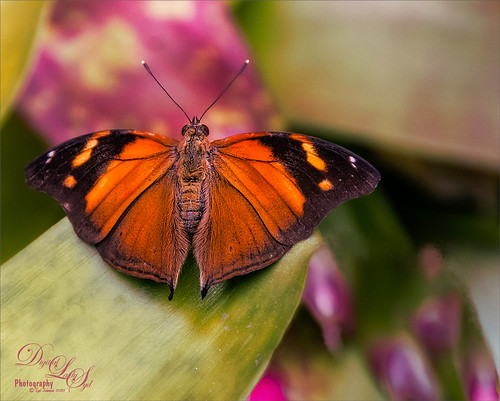
Image of a Autumn Leaf Butterfly

Just another one of the beautiful butterflies at the Florida Museum Butterfly Rainforest in Gainesville, Florida. This is a really fun place to visit if you are in the area and it open now. Just did my basic post work – a little Luminar 4 and Viveza, some painting, a Blake Rudis sharpening action, and a Blake Rudis Dodge and Burn action. I really enjoy post processing these butterflies……Digital Lady Syd

Expressing with Music

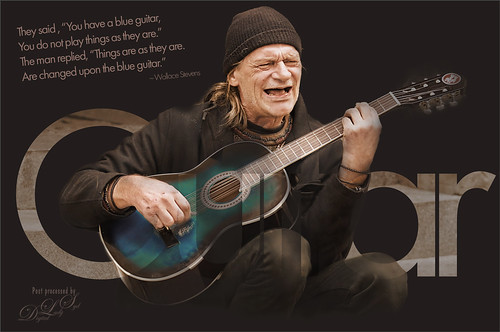
Pixabay image of a man playing his guitar

Was rather taken by this image of a man playing guitar from Pixabay. I used to play some guitar years ago so I am sort of partial to this instrument. There was another Photoshop Virtual Summit and one of my favorite presenters, Corey Barker, had a great video which included the above text effect. My first step involved adding three Luminosity masks for Highlights, Shadows, and Midtones – action info thanks to Blake Rudis, another excellent presenter. Then just Sharpening and Hue/Saturation Adjustment Layer changes. The last step involved creating the text effect by converting it to a Shape Object and using the Paths panel to drop out the text. A lot of new things to learn here and lots of fun…..Digital Lady Syd

Practice Makes Perfect

This image is from ISO Republic and is one of my favorites for practicing new Photoshop techniques. This time I decided use Topaz (see sidebar for website link) Studio 2 using some of the best filters from this program. I created a Studio Look a while back called “SJ BW to Painted Color Look” (for settings see my How to Convert Black and White Images to Colorful Paintings with Topaz Studio 2 blog) which was applied. On top the Color Theme filter was added and setting it to the Lighten blend mode and changing the third swatch to color #1c1c1e with Lightness set to 0.12. Color Theme filter is a great way to adjust one of the colors in the image without changing everything and one of the best filters in the Studio program. I also used Luminar 4 to add in the Sunray effect and a Color Lookup called Seattle. The font is called Garlic with both a regular and outline version stacked on top. Sure was fun to play in one of my favorite Photoshop plugins!…..Digital Lady Syd

Enjoying the Day

Colorized vintage image from Shorpy.com of Asbury Park, NJ

This is another example of an image that I colorized using the steps from my How to Convert Black and White Images to Colorful Paintings with Topaz Studio 2. I did use Topaz (see sidebar for website link) Sharpen AI and of course Topaz Studio 2 using the same preset as in the my original blog except the ReMix filter was set to Colored Marker for a style. Added a Color Theme filter to get the colors just right. To get a really nice effect, Topaz Lens Effect was applied for a bit of golden feel. That was about it. So fun to do these vintage images!…..Digital Lady Syd

A Beautiful Butterfly!

Image of a Blue Morpho Butterfly at the Butterfly Rainforest in Gainesville, Florida.

This was just a fun image to do. This is a Blue Morpho Buttterfly and was definitely one of the butterflies that stood out when at the Butterfly Rainforest in Gainesville, Florida. It looks like she is studying the artwork. Just did a few things with this image. In Lightroom used an old preset from Blake Rudis called HDR 4 – Exagerado. I don’t usually use presets but did not this one. In Photoshop ran Topaz DeNoise AI on this image, but only applied it to the green foliage on the left and on the actual body of the butterfly. I did not want to remove the natural texture from the rest of the image. Added a Gradient Map Adjustment Layer set to a brown to clear gradient set to Overlay blend mode at 75% layer opacity. Also added a Color Lookup Adjustment Layer set to Fall Colors preset at 45% layer opacity. Some dodge and burning with done and a Levels Adjustment Layer for a vignette was created and set to 71% layer opacity. Ran a High Pass Sharpen layer. Last step was a Curves Adjustment Layer to add brighten up the midtones a little more. That was it!….. Digital Lady Syd

Zooming Man a Ray

Image of a Man a Ray at the Jacksonville Zoo

Just had some fun with this image. Used Topaz (see sidebar for website link) DeNoise AI Clear, Topaz Sharpen AI, and Topaz Studio Motion Blur. Other than that just had to draw in a few lines that were a bit too blurred from the motion. The font is modernline. A Color Lookup Adjustment Layer was applied and a spotlight effect was added just to his nose. ….. Digital Lady Syd

My Favorite Lemur

Image of Gulliver, a Coquerel Sifaka Lemur at the Jacksonville Zoo

This guy is my favorite Lemur – a Coquerel’s Sifaka Lemur – at the Jacksonville Zoo. Definitely a very friendly male who is always glad to say “Hi” when you come by his exhibit. Luminar 4 (see sidebar for website link) was used on the image and of course Viveza. I love working on the beautiful animal images from this Zoo…..Digital Lady Syd

The Wildfire

Image of Spanish Moss forest in yellow and oranges

This image is actually of trees covered with Spanish Moss, but apparently I got carried away thinking about all the fires in the West and ended up with a very scary image. Some think it actually looks like a really sunny day in Autumn. I actually turned this image into a black and white with Nik Silver Efex Pro. The birds were created in Corel Particle Shop. Then a Gradient Map was applied to add this brilliant orange and yellow effect using a gradient made up of reds and oranges and yellows and set to Color Burn blend mode. On separate layers painted in clouds that looked like smoke in brown, beige, yellow and orange. Then back into Particle Shop to add some more smoke effects. Used Viveza to add the final border vignette and that was about it. It was fun to just take an image and see what can be done with it!…..Digital Lady Syd

Enjoying a Covered Patio

Image of a covered patio at the Garlic Restaurant in New Smyrna Beach, Florida.

Had some fun with the beautiful lighting of this covered patio at The Garlic Restaurant in New Smyrna, Florida. Lots of nice tables outside to enjoy a refreshment before the evening arrives. This image was a bit hard to post-process due to the lighting issues. Luminar 4 was used to get the rich colors (I find this Photoshop plugin is great for this – see sidebar for website link) and Viveza was able to draw the focus to the correct areas. A few Adjustment Layers to lighten and darken some parts of the image and that was about it. Wish I lived closer to this place – a great place to have dinner!…..Digital Lady Syd

Standing Guard at the Hospital

Image of the Spanish Military Hospital Museum in St. Augustine, Florida

This image was taken a while back of the Spanish Military Hospital Museum in St. Augustine, Florida. What I was trying to do was get an interesting texture on the building. This was done using one of my very favorite Photoshop plugins, Luminar 4 (see sidebar for website link). By following one of their fun videos on YouTube called Create an Antique Faded Look by Darlene Hildebrandt, the effect was created. The Essentials Color filter, Creative Matte Look filter, and the Professional Split Toning (Amount 50 and Shadows Hue 56 and Sat 60) were applied to get the antique effect. Then Lucis Pro 6.09 (which appears to be no long available unfortunately) was used to get really cool color wash look. Just a lot of fun. ….. Digital Lady Syd