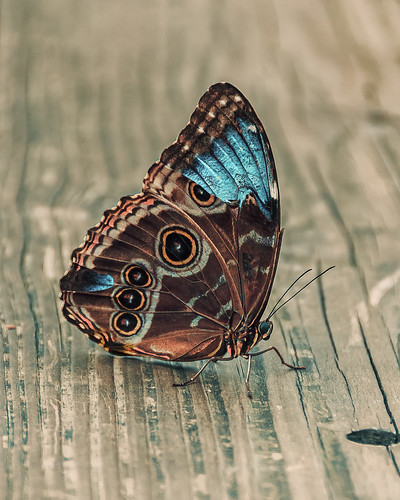
Recently went to the Florida Museum’s Butterfly Rainforest in Gainesville. There were several of these Blue Morpho beauties flitting around – and not standing still for very long – but little one had a ripped wing and was having a some trouble. It games me a chance to get a great photo of both the gorgeous iridescent blue on the back side of her wings and the camouflaged brown on the bottom side. These butterflies were just spectacular to see! And not much was done to get the color – mainly just some Topaz (see sidebar for website link) Sharpen AI and Viveza to some extra sharpness and adjust the color. Also the Camera Raw Filter was used to adjust color on the brown of the wings. These butterflies were definitely the hit of the season at the museum. …..Digital Lady Syd

Latest
A Vintage Gas Station

Had a lot of fun colorizing this vintage image taken in 1941 in Minneapolis, Minnesota, using mostly the settings from my recent blog called How to Convert Black and White Images to Colorful Paintings with Topaz Studio 2. Click here to see the black and white photo at Shorpy.com. In the Look I settings I provided, the unchecked ReMix AI was turned on and the Eye of the Storm style set to a High strength and the Overlay blend mode (Brightness -0.41, Contrast 1.42 and Hue -1.00 sliders). The Quad Tone Filter was added on top and the Strength was set to 0.65 – this added a little color in the sky and reduces the color around the flags. Back in Photoshop Viveza 2 was added and the attendant was highlighted to emphasize him a little. On a stamped layer Topaz (see sidebar for website link) Restyle was added using the Butterfly Wings preset – the ReStyle Opacity was set to 30% and the blend mode to Multiply. Give this a try if you have Topaz Studio!…..Digital Lady Syd
Introducing the Magnificent Great Orange Tip Butterfly

Yes, brought in all the way from Japan is this little beauty, one of many exotic butterfly species that were entertaining visitors at the Florida Museum’s Butterfly Rainforest exhibit in Gainesville, Florida. She was totally enjoying all the bright colored flowers as she zoomed around the exhibit. I did use a free Lightroom preset, which I do not usually do, to get the really darkened down effect – it was called KP01-Lone Pine from the Explorer Pack at Adobe, then added a bit of Texture and Clarity to it. Very little was done to this image other than sharpen it up a little – used both Topaz Sharpen AI and Luminar Flex to do this. (see sidebar for links to both of their websites.) The Spot Healing brush and a soft round brush at 30% opacity was used to clean up a few rough edges and halos on the foreground yellow flowers. Otherwise that was it. I love combining two of my favorite subjects – butterflies and flowers – in one image!…..Digital Lady Syd
A Happy Giant Otter

I love it when I go to a zoo and the animals seem happy. The Giant Otter exhibit at the Jacksonville Zoo is one area where the all the otters seems so happy and were totally enjoying themselves. A great place to relax and just watch them while at this Zoo. It is very hard to photograph these fast moving animals, but if you are persistent, a good image can be achieved. Not a lot was done on this image but there was a lot of reflective glare from the water spectral highlights. That is why I decided to use Topaz (see sidebar for website link) Studio 2’s Impression – applied a preset created by Jai Johnson (a fabulous wildlife photographer and texture creator) called Just Paint Hummingbird Scene. (Check out her Artistry Beyond the Camera Episode 1 video for settings – she uses Topaz photoFXlab software, but the Topaz Impression settings are the same.) I made a few changes to the strokes in the Impression filter. Back in Photoshop opened up Luminar Flex – like it to sharpen when Topaz Sharpen AI does not work. Their Detail, Clarity, Structure and Microstructure filters are terrific for this. (These are the same filters as Luminar 4 – see sidebar for website link.) A little line clean up and a free Rain Overlay (from Book Cover Mockup Rain Overlay by Design Cuts) was added at Screen blend mode at 56% layer opacity. A Levels Adjustment Layer was used to add contrast. That was it. What a cute little fellow!…..Digital Lady Syd
Just Gulliver Saying Hi

Gulliver is a Coquerel’s Sifaka, a medium-sized Lemur. What a character – I could hang out with Gulliver all day at the Jacksonville Zoo. Not a lot was done to the image – it just looked better in black and white to me. Used Topaz (see sidebar for website link) Sharpen AI first, then painted some of his hairs a little darker using some of the brushes noted in my recent blog called Getting the Joel Sartore Look on Your Zoo Images. Little bit of Spotlight Effect on his face and that was about it. He is so photogenic and seems to love to have his picture taken. Go visit him if you get a chance to go the Jacksonville Zoo – he will put on a little show for you……Digital Lady Syd
Looking for his Valentine

My Valentine Jaguar buddy from the Jacksonville Zoo was caught looking into what looked like a little window is all dressed up in his holiday pajamas. I thought this image would make a nice Valentine’s Day card so that is what I did. He was actually turned into a sketch using a tutorial called 5 Easy Steps to Create a Realistic Little Drawing from a Photo in Photoshop by Jesus Ramirez. Just followed the steps and painted in some heart shapes on the rocks using a Color blend mode to give the painted effect. Painted the heart pattern out of his spots using an 8-pixel soft round brush and Gruts H Hatch Wren brush (if you have not checked out Gruts brush website, take a look-it’s great). It took awhile but was lots of fun to do. Happy Valentine’s Day!…..Digital Lady Syd
The Red Cedar Stump

Had fun with this great image from Shorpy’s – the historical photo archive site. This image was called Pacific Highway through a Washington Red Cedar Stump and was taken in 1920. Here is a link for info on this stump which is still standing in the State of Washington. Is this guy really looking at his phone????
Recently I did a Fun Photoshop blog called How to Convert Black and White Images to Colorful Paintings with Topaz Studio 2. This image followed this technique except a different Look that was created in Studio 1 a long time ago was applied. Three filters were in the Look: Color Themes, AI ReMix (used Wave of Color Style), and Precision Contrast. Also HSL Color Tuning and Details (with settings in the minus to give a painterly effect) filters were added. Back in Photoshop Viveza was used to balance it all out. Last step involved adding a bit of a vignette so car and man stood out. It was a nice image to colorize. ….. Digital Lady Syd
Sneaking a Quick Snack

Here is Gulliver, one of my favorite animals at the Jacksonville Zoo. He loves to perform for all the visitors and is always available to entertain you. Just thought I would give him a little bit of Joel Sartore, the famous National Geographic photographer) clean classic style. His PhotoArk images are currently being displayed all around the Jacksonville Zoo which was a real treat. A perfect selection of the subject is essential to get this effect. It took me a bit of time to get the edges just the way I wanted them with no discoloration from the green background – used a brush with sharp edges and cloned away the bad parts. (See my How to Save a Photoshop CC2018 Regular Brush as a Different Tool blog which tells how to create this fur brush.) Then a very small blender mixer brush was used to fix some of the hairs around his body. The other crucial part of this type of image is getting the lighting on the animal correct. I had taken this image through a plastic smeary glass with some glare, so the contrast had to be really adjusted to get a clear look. It was pretty labor intensive but worth it when you get a final image you like…..Digital Lady Syd
The Rag-a-Muffins

Enjoyed painting this image but it took awhile to figure which way to do it. I actually ended up using Jessica Johnson’s Pattern Stamp technique using her brushes also (see my What About the Pattern Stamp Tool? Not Bad! blog). Clean up was done Gavin Phillips smudge brush, which is actually a regular brush but does a great job. An Impasto Layer was created to give a more painterly look (see my How to Create an Impasto Texture Layer Style blog). Otherwise that was about it. Lots of fun!…..Digital Lady Syd
Landscape of Old

Finally got back to painting. A lot I have forgotten and a lot more to learn but it was nice to get back into Corel Painter. If you have Painter, check out Davey Baker’s Painter 2018 Awe-Inspiring Environment Painting. The video was actually done in 2017 I believe, but Corel has re-released it and runs for almost an hour. He only used one brush called Wet Brush (check out his short video called How to Create Custom Wet Brush for more on this). I changed my brush from his slightly and created two more variants to do the detail work. What I did learn was that to be able to do this, you need to understand how to use the brush so practice with it on a separate layer before painting. Davey’s video had several tips on painting and other things. In Photoshop I actually used Grut’s FX Cloud Lumens (the best Cloud brushes ever made) to create the clouds as I did not like how mine looked using Dave’s Wet Brush settings in Painter. Also used Perfectly Clear v3 Magic Hour preset to adjust the exposure correctly. For final clean up work, used Fay Sirkis’s (a Corel Master but she also did PS videos and brushes at one time) Precious Oil Diamond Blender Mixer brush that I have used for years (the only place her brushes are still available is on KelbyOne – if you are a member, do a search for her name – she has 5 webinars, which are still great, and brushes can be downloaded). This was so much fun but it took several hours to complete……Digital Lady Syd
Topaz Labs AI Gigapixel
Check out AI Gigapixel stand-alone software for upsizing your images. It’s incredible! And it can now be used as a plugin when in Photoshop. Also Topaz Labs Photo AI has some great sharpening and denoise tools along with Photo Video AI.

Luminar Neo
Click here to visit Luminar for more info and check out their new AI Filters.

GRUT BRUSHES – Photoshop Brushes for Digital Artists
Click here to visit GrutBrushes.com
And be sure to check out his Free Brush of the Week and Brush Sampler! These are the best brushes you can find!

Topaz Studio 2 and Legacy Topaz Labs Filters
Unfortunately Topaz Studio 2 and other Topaz Lab filters are no longer available for sale as of 2020. If you had bought these filters and would like to put them back on, here is a link to the Legacy Apps where they can be downloaded again. Below is an example of the wonderful Remix AI Filter from Studio 2. The wonderful Impression still works fine in Photoshop right now along with Adjust (all versions), ReStyle, and even PhotoFXLab!

On1 Photo Raw
Wonderful software to use as a substitute for or plugin with Photoshop. Many great filter effects and lots of AI capabilities!
