Anything Photoshop or Photography

Latest

An Urgent Plea

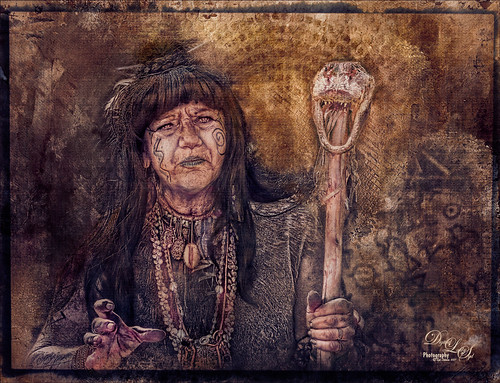
Image of a Native American Woman
This is a lovely Native American woman I met at the recent Ormond Beach Native American Festival. She was actually doing a little presentation to the students from the local elementary schools on Native American traditions. I wish I could remember which was her tribe, but I would bet she is or was a teacher – very entertaining for the kids, and us adult kids too. Her expression reminded me of the past plight of the American tribes, and liked the fact that she represented how a female member would be attired. I can honestly say this image took me forever to finalize – just could not pull the whole look together. Finally the right textures fell into place and ended up just using my basic Photoshop workflow. Lucis Pro added the detail as an almost hyper-effect mode. Topaz (see sidebar for website link) ReStyle was used to get an interesting color palette and Topaz Texture Effects 2’s Fudge Brownie preset gave the vintage feel to the image. Then several clean up layers and of course, Nik Viveza 2 to draw attention to the face and the Alligator stick (hum). Needless to say, the kids loved that artifact. Just one image but three textures from 2 Lil Owls (see sidebar for website link) and one from Kim Klassen were used to get the final effect. Overall it turned out pretty much like I wanted…..Digital Lady Sy

An Army Tortoise

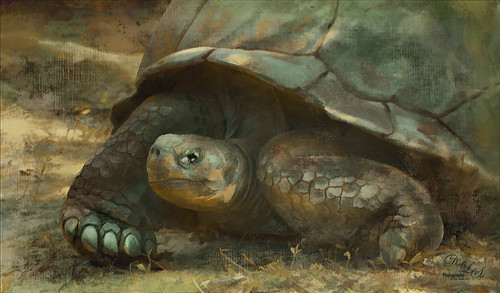
Image of a Galapagos Tortoise at the St. Augustine Alligator Farm
I have visited the St. Augustine Alligator Farm many times over the past few years and for some reason, these huge Galapagos Tortoises always catch my eye. They always look the same and are not particularly colorful, but for some reason this image caught my attention as it looks like he is wearing an Army camouflage helmet on his back. I just could not pass up the chance to try it out, so here my Army Tortoise – I think he really has a bit of a military expression on his face.

Just my basic workflow using Topaz Clarity to sharpen him up a bit, Topaz (see sidebar for website link) Simplify using a preset created from Serge Ramelli’s video called How To Turn a Photo into a Cartoon with Topaz Simplify 4.0, a Selective Color Adjustment Layer to turn the blue tones in his shell to green, Nik Viveza 2 to even out the edges, a Lighten and Darken Curves Adjustment Layer to slightly dodge and burn the image. 2 Lil Owls (see sidebar for website link) Mosaic Set Benoit textures was added and set to Multiply blend mode, and her Mosaic Set darcy grunge texture was set to Screen blend mode. For this texture the Blend If This Layer white tab slider was split and set to 90/128 to give the pattern effect just on the outside of the image. On a New Layer set to Overlay, a couple large round soft strokes were made to act as a spotlight on his face and part of his shell. A little clean up was done to finish up. I really think he looks so much more interesting now!….Digital Lady Syd

Poising for a Portrait

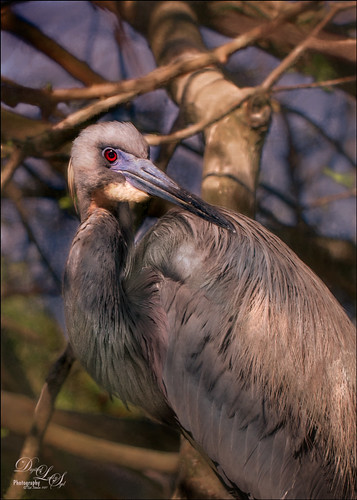
Image of a Tricolored Heron from the St. Augustine Alligator Farm Rookery
This beautiful Tricolored Heron is waiting for her mate to return to the nest with more nest ingredients. I could not believe how beautiful her eyes were! And where is her neck – how does she do this? The image had lots of shadows on her feathers that had to be removed – used both Lightroom’s Adjustment Brush set with the Saturation way down and clarity up to retain the feather structure, and then in Photoshop used a little cloning on the feathers. On a stamped layer (CTRL+ALT+SHIFT+E) Topaz (see sidebar for website link) Clarity was applied to pull out the feather details more – the background was painted out in a layer mask. (For Clarity settings, see below.) On another stamped layer Topaz Impression 2’s Jai Johnson’s Oil Glaze Light Original Color for noise removal preset was applied. (Need to try this preset if you shoot bird and wildlife photography – see her preset settings in her video In the Digital Studio January 6, 2017). Darken and Lighten Curves Adjustment Layers were created and the layer masks were filled with black. (See my How to Use Curves Adjustment Layers to Dodge and Burn an Image blog.) Areas that needed either adjustment were painted back. A Red Channel Luminosity Curve Adjustment Layer was created. (See my How to Use a Red Channel to Create a Nice Blended Image Effect blog.) Then an orange Solid Color Fill Adjustment Layer was applied at 19% layer opacity to warm up the image slightly using the mask to remove areas that were too warm. Finished up with Nik Viveza 2 to add a little vignette and drive focus to the bird’s eye. I just love the expression of this lovely lady…..Digital Lady Syd

Here are the basic Clarity settings used for my SJ Scottish Landscape:  Clarity Section – Dynamics: Micro Contrast 0.73, Low Contrast 0.33, Medium Contrast 0; and High Contrast -0.34; Tone: Black Level 0.69, Midtones 0.02, and White Level -0.34; Hue/Sat/Lum Section – Hue Red 0.13, Orange 0.11, Green 0.33, and Aqua -0.36; Sat Red 0.19, Orange 0.14, Green -0.31, and Blue -0.19; and Lum Red 0.59, Orange 0.16, Yellow -0.02, and Green -0.37; all not listed colors were set to 0. For this image, changed Medium Contrast to 0.70, set all Hues to 0, and changed these Lum settings to: Orange 0.39 and Yellow -0.87.

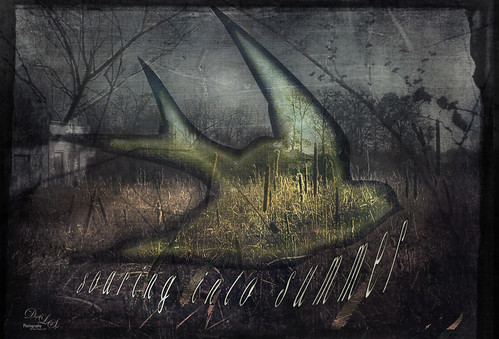
Soaring into Summer

Grunge image of a Bird soaring into summer over a Field
This image is a composite from a couple different photos and several textures. I have never tried any real grunge effect so this is quite a change for me. Basically lots of layering and adjustment layers to pull this together. The original image was taken across the street from my old home on Lake Wawasee (click to see the webcam) in Indiana and was a huge marsh of Pussy Willows at this time. Two 2 Lil Owls (see sidebar for website link) – Ancient 1 and Jewel Chalks 19. The font is  Nomah Script and was warped to fit the bird. The bird is from Photoshop Creative magazine No. 12, and the foreground contains  Midnightstouch Grasslands 3. Topaz (see sidebar for website link) ReStyle to get a better color adjustment. From Shorpy’s (my favorite vintage image site) an Abandoned Garage on Highway No. 2 in western North Dakota in October 1937. A layer mask was used to blend it in the background. A dark border was added and Nik Viveza 2 was used to adjust the final lighting effect. Lots of work on this one and I hope it conveys the effect I wanted of a bird soaring over the field and adding an element of warmth to the rather drab image……Digital Lady Syd

Teasing the Bird Paparazzi

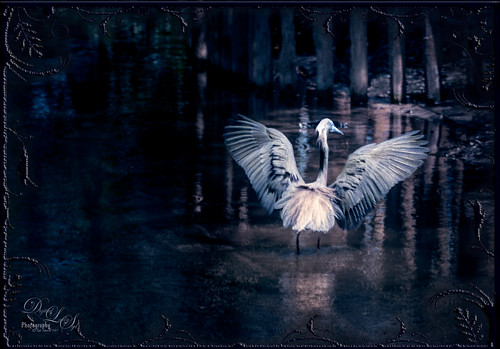
Image of Snowy Egret flying at the St. Augustine Alligator Farm Rookery
This beautiful snowy egret looks like he is having a great time showing off in front of the large group of photographers trying to get him centered in the cameras. I thought this was one of the funniest images I have taken at the St. Augustine Alligator Farm Rookery. Added Gaussian Blur to the whole image at Radius 12.5 and painted back the bird. The whole background was just too busy and the photographers way too distinct. On just the bird a little Topaz Clarity was used to bring out the detail in the bird’s wings especially. Used an Exposure Adjustment Layer to sharpen the eye. Then Topaz ReStyle’s First Steps preset was applied. Used Nik Viveza 2 to balance out the color in the image and on the birds wings. A Red Channel Luminosity Curves Adjustment Layer finished up the image. It was a little tricky to not over-sharpen the bird to keep it from looking like a composite. I had to spend a lot of time just toning down the edges to blend into the overall background. Still like the image…..Digital Lady Syd

Building a Nest for the Future

Image of a Roseate Spoonbill at the St. Augustine Alligator Farm Rookery
One of my favorite birds to photograph, partly because they are so funny. This Roseate Spoonbill had to work pretty hard to get the branch broken off the tree limb so his mate could add it to the nest at the St. Augustine Alligator Farm Rookery. The couples work very hard together getting it all just right. This guy was in such a busy background that I had to figure out a way to calm it down. Decided to go with a bit of a glamour look to soften the whole image down thanks to Sebastian Michael‘s action. (If you took his course, the link is in a recent e-mail.) I hope I get to find this guys nest and see the chicks that will be hatching soon. ….Digital Lady Syd

Have a Good Day!

Image of typography
Spent a good part of Sunday going through the wonderful videos by Sebastian Michaels on Typography. They are available when you buy the Somerset Digital Studio magazine for Spring 2017 and there is lots of info on this tricky subject. The above is what I created after listening to a couple hours on how to do this – lots of fun. The number of fonts is a bit excessive but many belong to a similar class of fonts. I was mainly practicing how to incorporate different fonts with different techniques. (Some of the fonts were free and a few I own and are as listed: CF Anarchy, Dancing Script OT, Mistral, Fuse, 1942 report, DomCasual BT, Angelic War, Naive Deco Sans, Blackoak Std, Catalina Avalon Sans, Blackboard, and Trajan Pro in case you might want to download one of them.) The tree on the side is Tree-169 brush by Midnightstouch. The really nice swirl is from missm-flourishes-sample brush 2/312 size. I believe there are 37 Layers and 5 Groups in this little creation using lots of layer styles, colors, and adjustments layers, and even Topaz (see sidebar for website link) Impression 2 (Cartoon Your Critter preset). The original background texture is one I created in Photoshop using a beautiful cross-hatching effect with a brush from Just Jamee Summertime 2012 Brush Sampler 4 brush and a Bevel & Emboss layer style and using two different colors, then smoothing out parts with Gruts FX Cloud Billoway brush. Most of the fonts were obtained for free on the internet. Overall a very interesting way to spend a day!…..Digital Lady Syd

St. Giles Cathedral Entranceway

Image of St. Giles Cathedral in Edinburgh, Scotland
This image of St. Giles Cathedral in Edinburgh, Scotland is of the West Doorway and contains many interesting carvings that were done by John Rhind in 1884. I am still trying to figure out who the sculptures are of – they represent historical people of Scotland – the middle guy is named Alexander, maybe the king who erected the first church at this location in 1120. Also the Gargoyle surprised me as he was rather prominent in the image (they are used as waterspouts and protect the church from evil spirits). I still wonder who all the people are that are just carved faces in the wall. The workflow is basically the same one used in the my Adding a Creating Painting Effect Fun Photoshop Blog. Lucis Pro was used to sharpen it up a bit. Topaz (see sidebar for website link) Impression’s Abstract Settings Blake Rudis set to 63% layer opacity. A white layer with many parts painted out in a mask. A frame was added with a Pattern Adjustment Layer clipped to give the soft pink tones. Some clean up, a little dodging and burning, and Nik Viveza 2 to finish off. Would love to get back to Scotland and see who all these carvings are. ….. Digital Lady Syd

Save

Save

Tiny Red Berries

Image of little Red Berries
These little red berries were found growing on a shrub in my yard – they appear after some tiny white flowers fall off of it. This strand was only about 1 inch long and the image was taken with my Lensbaby Composer at F/4 using a Macro +4 Lens. In Lightroom a Scott Kelby Trendy High Contrast Look preset was applied and a lot of time was spent to sharpen the berries using the Adjustment Brush. This image had a lot of noise in the image so the Detail Sharpening Amount and Noise Reduction Luminance sliders were set to 0 so it could be removed more effectively in Photoshop. Once in Photoshop Topaz (see sidebar for website link) DeNoise 6 using the Raw Moderate preset was applied and did a much better job of removing the noise.  This layer was duplicated and Topaz Texture Effects 2 was opened where the Fantasy Land II preset was added. A bokeh texture was inserted into the preset for the 2nd Texture section. In the Masking Enabled part of the Texture section, a black brush set to a Strength of 0.43 was used to lightly remove any bokeh effect from the berries. The Texture Effects layer opacity was set to 91%. On another duplicated layer, Topaz ReStyle was opened and the Swam and Sherpa Blue preset was applied and set to 50% opacity and Screen blend mode in the plug-in and once applied, the overall layer opacity was set to 85%. Just finished up with the Black & White Adjustment Layer set to 56% layer opacity pop the colors and set to Luminosity blend mode, a Red Channel Luminosity Curve Adjustment Layer to tone down highlights, and Nik Viveza 2 to adjust the focus and add a little vignetting. Pretty much my regular workflow. …..Digital Lady Syd

Save

Palm Frond

Palm Frond from Ormond Beach Memorial Art Museum and Gardens
This rather abstract-looking palm frond was taken at the Ormond Beach Memorial Art Museum and Gardens. I was unable to figure out what the actual string-like material is – whether it is part of the palm or some type of Spanish Moss. Lucis Pro was used to sharpen the image. Topaz (see sidebar for website link) ReStyle’s Blue Shades preset was applied to the image. Next on a New Layer the String was selected and an Outer Glow layer style was added to emphasize it. A Levels Adjustment Layer was added and a Red Channel Luminosity Curves Adjustment Layer was applied. Nik Viveza 2 was applied on a stamped layer and then Matt K’s Vignette was applied. (See my Fun Photoshop How to Create a Subtle Vignette blog.) I am going to go back and see if I can find out more about this particular type of palm. ….. Digital Lady Syd