Anything Photoshop or Photography

Latest

A Pink Orchard

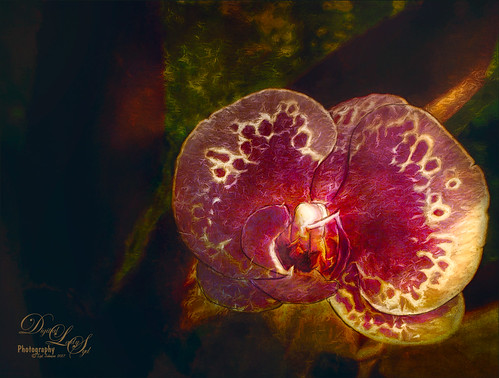
Image of a Pink Orchard
This orchard image was taken at the Harry P. Leu Gardens in Orlando, Florida – a wonderful place to take flower images if you are in the area. This image was started several weeks ago so I am not completely sure what I wanted as an end result. This flower began as a purple orchard, but Topaz (see sidebar for website link) Texture Effects 2 was opened and the Citronella Lily was applied with several adjustments. On a stamped layer (CTRL+ALT+SHIFT+E) Topaz Impression’s Fine Brush Scumble was applied. On another stamped layer, Topaz Detail 3 was applied, another composite layer and Lucis Pro was applied, and finally on yet another stamped layer, Topaz ReStyle’s Rustic Red and Orange preset. Sort of amazing all the Topaz effects in this little flower! I used my favorite line brush, Grut’s Ink Pin Clinger – to actually draw around just a little around the petals. Two textures were added: Kim Klassen’s August Trio Traverse blend mode set to Vivid Light at 18% and her Fav Collection Cinnamon set to Multiply blend mode at 65% layer opacity. A couple Curves Adjustment Layers and a Color Lookup Adjustment Layer set to Foggy Night at 55% layer opacity. Another stamped layer was created and Nik Viveza 2 was used to adjust the lighting in the image. A Red Channel Luminosity Curve was applied as a final step. Lots going on here……Digital Lady Syd

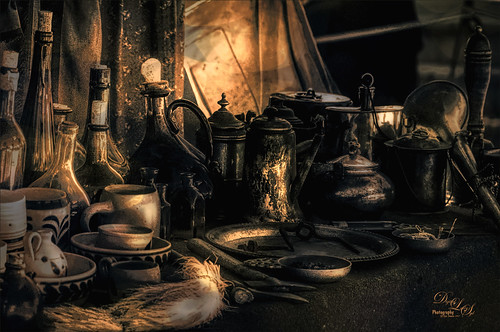
Native American Bottles, Pots and Dishes

Image of Native American Bottles and Dishes
This image taken at the Ormond Beach Native American Festival was actually turned into a black and white in Lightroom. Painting in the highlights with an adjustment brush really made the light pop in the final iteration. In Photoshop, to remove a bit of noise, especially in the shadows, Topaz DeNoise 6 was used to remove it (used the Overall and Shadow sliders). Then Lucis Pro was opened to sharpen the details a little. It was set to Difference blend mode at 24% layer opacity and the Blend If sliders were used to further pull in the details. A Curves Adjustment Layer was used to add contrast. For color a Hue/Saturation Adjustment Layer was set to Colorize and a teal color effect was selected. Next another Hue/Saturation Layer was opened and a yellow-orange was applied to just the Highlights of the image. At this point the image looked really flat, but kind of old and vintage looking. I rather liked it. On a stamped layer (CTRL+ALT+SHIFT+E), Topaz ReStyle was opened and the Rustic Red and Orange preset was applied with a few adjustments and set to 74% layer opacity. On another stamped layer Topaz Texture Effects 2 was opened and A Little Dingy preset was applied. The Texture section was changed to a gold and black bokeh which enhanced the lighting effect. That was all that was done……Digital Lady Syd

The Mighty Bat Flower

Image of Bat Flower at Harry P. Leu Gardens in Orlando
This unusual Bat Flower taken at the Harry P. Leu Gardens in Orlando, Florida, is an image I have wanted to post-process for a long time. I keep expecting a little Batman to come flying out of its center! It was a little tricky since it has such unusual antennae-like strands coming out of it, and there was a lot of light issues on the original image. The actual flower has a more brownish tone. I originally post-processed it set to the actual color, but it looked pretty boring. Therefore, I took a little artistic license and changed it to some of the purple shades already in the original image to give it a little pop.

There was mainly just a lot of clean up on this flower. A Selective Color Adjustment Layer and a Color Balance Adjustment Layer were used to adjust that color discussed above. Nik Viveza 2 was used to get the highlights on the flower just right and to darken the edges. A Green Channel Luminosity Curves Adjustment Layer was set to Luminosity blend mode at 73% layer opacity to mainly adjust the contrast on the actual flower. A Matt Kloskowsky Vignette (see my How to Create a Subtle Vignette blog) was applied as a last step. Not that much – just a lot of clean up! I think this is one of the most interesting flowers I have ever seen!…..Digital Lady Syd

Just Hanging Out with His Buddies

Image of Alligator visiting with his buddies at the St. Augustine Alligator Farm
Just thought I would add this image of a bunch of alligators enjoying hanging out at The Rookery at St. Augustine Alligator Farm waiting for that egg that happens to fall out of a nest. Sad but true–sigh! Just my basic workflow here – some Lucis Pro, Camera Raw filter and Nik Viveza 2 to adjust the focus. Some Dodging and Burning, and Luminosity Curve and Black & White Adjustment Layers. Just a lot of fun here!…..Digital Lady Syd

Here comes the Sun!

Image of berries in my back yard
This is an image of some berries taken in my yard recently using my Lensbaby Composer, which give the soft effect. Mainly just a lot of work in Photoshop. This image actually uses three of one of my favorite texture people, French Kiss Textures (see sidebar for website links), to get this pretty effect: Atlelier Musing, Centre Ville, and Bohemian. Her textures are always beautiful and painterly. Lots of my standard adjustment layers were needed to get this effect along with a final adjustment in Nik Viveza 2. Also many layers of clean up and painting. Lots of fun but it took forever! Still, it is reminiscent of the Beatles song…..Digital Lady Syd

An Engraved Leaf

Image of a cement leaf on a walkway at the Ormond Memorial Gardens
This image was taken at the Ormond Memorial Art Museum and Gardens of a pattern drawn into the sidewalk. The texture in the image was so nice, I decided to add a little pizzaz to it. First Topaz (see sidebar for website link) ReStyle preset Loulou and Mandy was applied. This gave it the bright orange and turquoise colors. Three adjustment layers were stacked: Color Lookup using Fuji F125 Kodak 2395, Levels, and Photo Filter using Cyan at 52% density. On a stamped layer (CTRL+ALT+SHIFT+E) Topaz Texture Effects2 was applied using a Dingy Cream preset. On another stamped layer, Nik Viveza 2 was applied to adjust corners. A Vibrance and Saturation Adjustment Layer was used. Then I decided to create a brush from the texture of a section selected using the Marquee Tool, turned to black and white, then painted out some more areas, and went to Edit -> Define Brush Preset. Now used the brush to paint in some added texture over the feather and flower and in blank parts of the image to add more texture. I really like the brush I created and hope to use it some more!…..Digital Lady Syd

The Pond Fairy…is always watching you

An image of the Pond Fairy
The Pond Fairy was a lot of fun to create. The original image was a lily pad pond image taken at the Ormond Memorial Art Museum and Gardens. The sun appeared in the water as a brilliant white glare where the face is located. The fairy face is made from a brush I created from a model’s face. Corel Painter’s ParticleShop Photoshop plug-in was opened and the Cluster brush set to a bright yellow with the Glow checked and was painted on the plant on the left side and little on the tips of the lily pads. A texture from 2 Lil Owl (see sidebar for website link) called Mosaic Set Aqua Grunge – this is one of her best sets in my opinion – was applied and set to Subtract blend mode at 19%layer opacity. Topaz (see sidebar for website link) Lens Effects was opened and the Diffusion filter was applied to really soften up her face and some of the sharp lily lines. Then it was removed in part of the image with a layer mask. Topaz Restyle was opened and a preset was made of the image at this point. Then the actual image sliders were changed to get a little bit different color palette. This is a great way to get the colors just like you want them, especially if they are pretty close to what you like. The other presets just did not work with this image. (See my How to Use a Topaz ReStyle Trick for Improving Your Image blog for how to do this.) A few splats were placed on a New Layer to give a little fairy dust and water bubble look. On a composite layer on top (CTRL+ALT+SHIFT+E) and opened Nik Color Efex Pro 4 – used Detail Extractor, Glamour Glow and Midnight filters. This layer was set to Multiply blend mode and 24% layer opacity. A group was created for the face layers where the eyes, cheeks and lips were painted. Also the clover hat was added to her image here.  This was from my favorite object site – PixelSquid. The fish are from an image taken in Hawaii at the Hilton Waikoloa Village. It was layered on top of the water lily image, then free transformed to fit the pond area. A Black and White Adjustment Layer and Levels Adjustment Layer were set to get the correct tone and color in them. A layer mask was used to fine tune the fish into the area. Nik Viveza 2 was opened to adjust the focus. The text is a free font called Viner Hand ITC. Quite a few steps but lots of fun. So next time you look into a pond, check out The Pond Fairy who will be watching you…..Digital Lady Syd

Bird in Paradise

Image of a Tri-colored Heron at the St. Augustine Alligator Farm Rookery

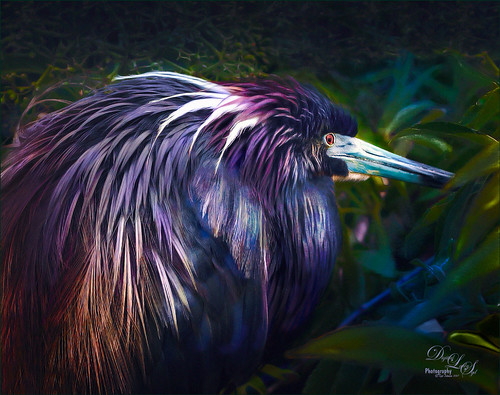
This male Tri-colored Egret is actually retrieving nesting material for his beautiful red-eyed female from a few posts ago. He would fly into the water, find a stick, run back to the nest, give it mate, then take off again to the same spot. I thought he was rather brave since there are alligators in the water at the St. Augustine Alligator Farm Rookery. This image was not altered as far as what the setting looked like – just added a couple textures, darkened down the image, and finished up with Nik Viveza 2 to even everything out. He definitely had a beautiful wing spread. The frame is from Shadowhouse Creations – Borders CM1 set (could not find a link) where the frame was taken into Select -> Color Range and just the frame was selected. Then placed on its own layer (CTRL+J), bottom layer deleted, and saved as PNG file. Now it can be placed on any image using any color or patterns. A Bevel and Emboss and Satin Layer Styles were used to give a dark wrought iron effect. Overall it turned out to look like a pretty serene place to be!…..Digital Lady Syd

An Urgent Plea

Image of a Native American Woman
This is a lovely Native American woman I met at the recent Ormond Beach Native American Festival. She was actually doing a little presentation to the students from the local elementary schools on Native American traditions. I wish I could remember which was her tribe, but I would bet she is or was a teacher – very entertaining for the kids, and us adult kids too. Her expression reminded me of the past plight of the American tribes, and liked the fact that she represented how a female member would be attired. I can honestly say this image took me forever to finalize – just could not pull the whole look together. Finally the right textures fell into place and ended up just using my basic Photoshop workflow. Lucis Pro added the detail as an almost hyper-effect mode. Topaz (see sidebar for website link) ReStyle was used to get an interesting color palette and Topaz Texture Effects 2’s Fudge Brownie preset gave the vintage feel to the image. Then several clean up layers and of course, Nik Viveza 2 to draw attention to the face and the Alligator stick (hum). Needless to say, the kids loved that artifact. Just one image but three textures from 2 Lil Owls (see sidebar for website link) and one from Kim Klassen were used to get the final effect. Overall it turned out pretty much like I wanted…..Digital Lady Sy

An Army Tortoise

Image of a Galapagos Tortoise at the St. Augustine Alligator Farm
I have visited the St. Augustine Alligator Farm many times over the past few years and for some reason, these huge Galapagos Tortoises always catch my eye. They always look the same and are not particularly colorful, but for some reason this image caught my attention as it looks like he is wearing an Army camouflage helmet on his back. I just could not pass up the chance to try it out, so here my Army Tortoise – I think he really has a bit of a military expression on his face.

Just my basic workflow using Topaz Clarity to sharpen him up a bit, Topaz (see sidebar for website link) Simplify using a preset created from Serge Ramelli’s video called How To Turn a Photo into a Cartoon with Topaz Simplify 4.0, a Selective Color Adjustment Layer to turn the blue tones in his shell to green, Nik Viveza 2 to even out the edges, a Lighten and Darken Curves Adjustment Layer to slightly dodge and burn the image. 2 Lil Owls (see sidebar for website link) Mosaic Set Benoit textures was added and set to Multiply blend mode, and her Mosaic Set darcy grunge texture was set to Screen blend mode. For this texture the Blend If This Layer white tab slider was split and set to 90/128 to give the pattern effect just on the outside of the image. On a New Layer set to Overlay, a couple large round soft strokes were made to act as a spotlight on his face and part of his shell. A little clean up was done to finish up. I really think he looks so much more interesting now!….Digital Lady Syd